
Review and Clean Up Stale Cards or Items
Overview
A stale card or item is a previously active entry that is no longer included in the current template. 5585 keeps it inactive instead of deleting it, so its personal tracking remains available for review.
5585 tries to keep template revisions connected to the collection, so most updates do not create a problem. Stale cards or items appear only when a previously active entry is no longer part of the current template. They stay out of the active list until you decide what to do with them.
Open Collection Tools, then select Review Stale Cards or Review Stale Items. The tool is unavailable when the collection has no inactive entries to review.
Review before cleanup
Each stale card or item can still include its image, template details, personal notes, collection status, wishlist priority, and image-index data.
Select the entries you want to remove individually, use Select All, or use Select None to clear the selection. The summary shows how many selected entries include cached images and saved personal tracking.
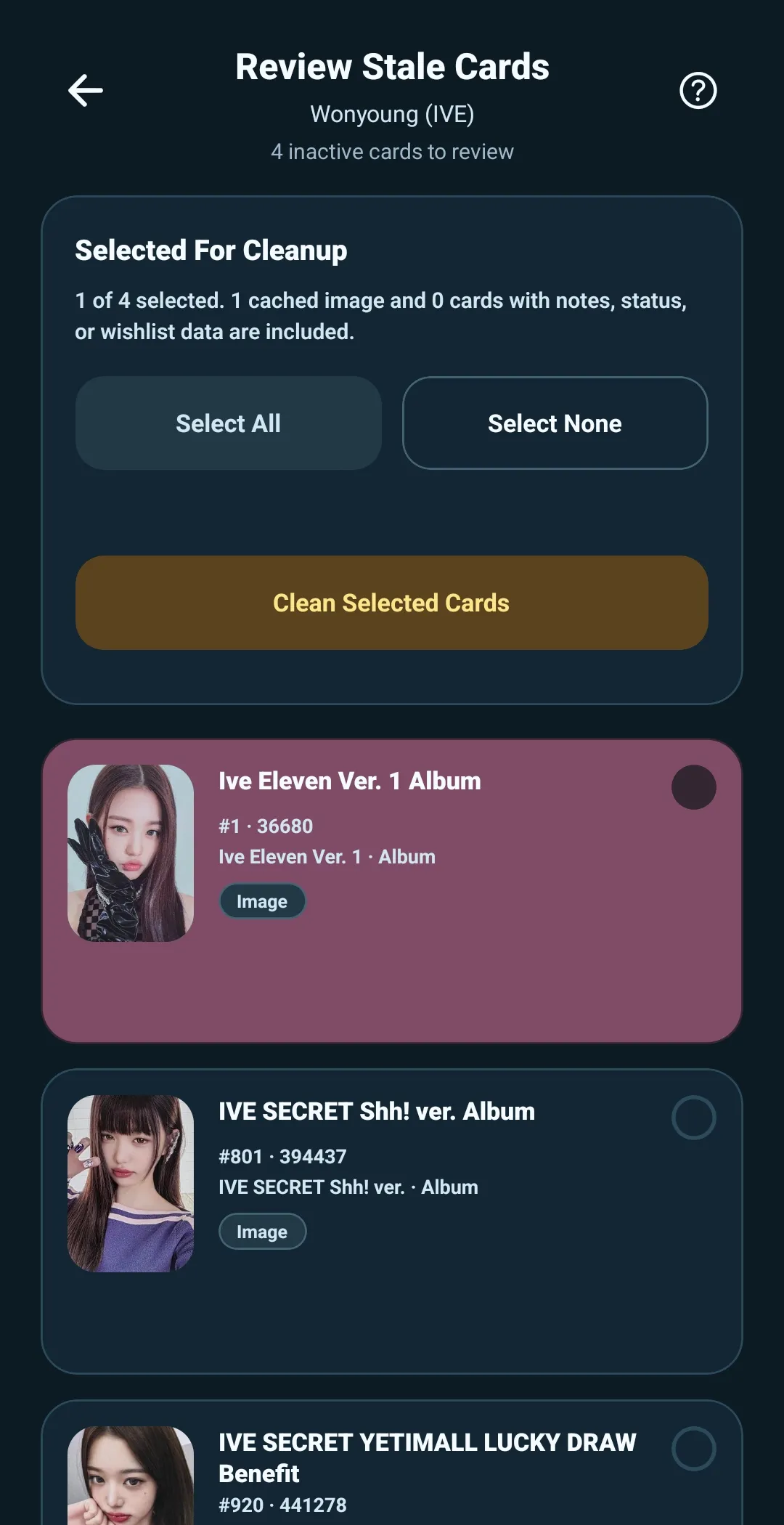
Clean selected entries
Select Clean Selected Cards or Clean Selected Items when you are ready. 5585 shows a final confirmation with the number of selected entries, cached images, and entries that contain notes, status, or wishlist data.
Cleaning permanently removes only the selected stale cards or items and their attached local data. It does not change active cards or items.
Do not clean a stale entry if you expect a later template revision to bring it back. Keeping it inactive preserves its tracking so it can reconnect if the same CardID becomes active again.