When taking a photo, most of us pull out our phone, look at the preview, press a button, and get a picture.
The relationship seems obvious: the camera sees an image, the screen shows that image, and the app saves it.
I assumed roughly the same thing.
I didn’t have much reason to question that assumption until I started building a guided camera capture.
A simple requirement
The problem came from Quick Capture, a feature I was building for 5585 to make repetitive image data entry faster. A fixed guide sits over the live camera preview. Line something up, capture it, and immediately move on to the next item.
There is no review screen and no manual crop afterward. The guide is the crop.
The requirement was simple:
What the user sees inside the guide should be what the app saves.
Initially, that seemed like a straightforward crop. The app knows where the guide is on the screen, and the camera gives us a photo. Find the same crop box in the photo and save it.
That assumption was the beginning of the problem.
The preview isn’t the photo
What I had overlooked was that the preview and the saved photo aren’t simply two sizes of the same image.
A phone camera can produce separate outputs for each. The live preview is transformed for display, while a full-resolution still image comes through a separate capture path. Quick Capture’s guide is drawn over the transformed preview.
So knowing where the guide was on the screen wasn’t enough to know where it belonged in the full-resolution photo.
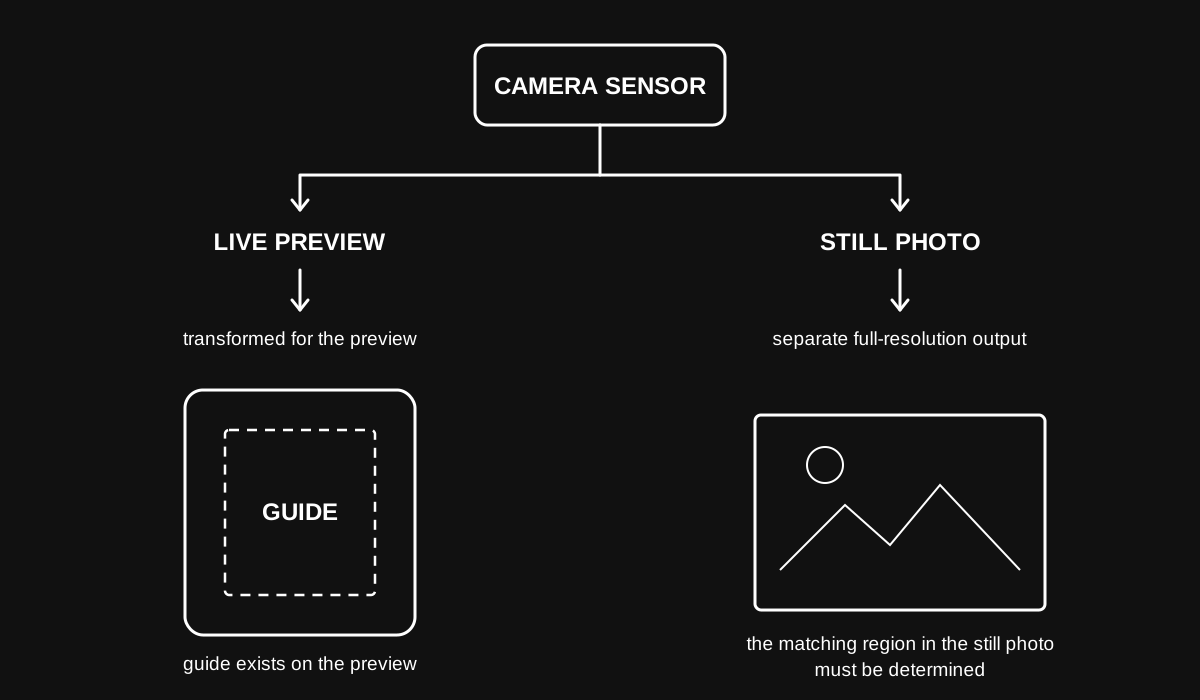
The guide belonged to the preview, but the image I wanted to crop came from a separate output.
What looked like a cropping problem was really a mapping problem.
Orientation was only part of it
The first implementations stayed within Expo’s camera ecosystem, partly because it offered a simpler path to keeping the feature cross-platform.
One of the first obvious problems was orientation. The preview could look correct while the captured image did not have the orientation the app expected.
I tried using image orientation information and even having the app determine how the phone was being held. That became fragile, particularly when the phone was nearly flat and there was no reliable way to distinguish which direction should be treated as up.
Eventually, the camera implementation moved to VisionCamera, where capture and orientation could be handled more predictably. The resulting images were finally consistently upright.
The framing still didn’t match.
That exposed an important distinction:
Correct orientation and correct framing are two different problems.
Fixing orientation had solved one part of the problem, but it hadn’t established how the guide on the preview mapped to the separate photo.
Stop mapping between two outputs
Instead of continuing to ask where the preview guide belonged inside a separate full-resolution photo, I changed the approach.
VisionCamera could capture a snapshot of the rendered Android preview itself.
Now the flow was much simpler:
Preview → guide → snapshot → crop
The app still had to translate the guide into the snapshot’s dimensions, but both now came from the same visual source. The difficult mapping between separate camera outputs was gone.
That solved the framing problem.
It also introduced a measurable tradeoff.
The cost was resolution
A live preview doesn’t normally need the camera’s maximum still-image resolution.
In one recorded capture, the preview snapshot measured 1080 × 2235. After cropping to the guide, the resulting image was 753 × 1167, or about 0.88 megapixels.
An earlier full-photo path used a 4000 × 3000 source. A comparable crop from it was 1377 × 2132, or about 2.94 megapixels.
The reliable preview-based crop contained only about 30% as many pixels.
This wasn’t the result of an unnecessary resize. The difference followed directly from choosing the preview as the source.
The full-photo approach preserved more detail.
The preview approach preserved the user’s framing.
Could the feature preserve both?
A better solution has a different cost
On Android, preserving both appeared possible, but it required going deeper into the native camera stack.
CameraX can give the preview and full-resolution capture a shared frame of reference, making it possible to map the guide onto the higher-resolution photo using information from the native camera system.
But VisionCamera didn’t expose enough of that native relationship for the implementation I wanted. Using it directly would mean adding Android-specific CameraX code, while a future iOS version would require its own solution.
The question was no longer whether the feature could preserve the additional resolution. It was whether doing so justified the additional platform-specific complexity.
Choosing the compromise
For Quick Capture, the additional resolution hasn’t yet justified that complexity.
Quick Capture is designed for fast, repeatable data entry, and its images primarily serve as visual references inside the app. In matching tests, the lower-resolution captures also haven’t shown a meaningful disadvantage.
Higher-quality images can still be brought into the app through slower alternatives when image quality matters more than capture speed.
The tradeoff matters more during template creation, where a Quick Capture image can become a persistent reference image and the additional resolution would be more noticeable.
But there isn’t currently evidence that users value that difference enough to justify separate native camera work.
So the existing implementation stays.
For this use case, reliable framing, fast capture, and future cross-platform capability currently matter more than maximum source resolution.
That decision can change if the requirements change.
There wasn’t one correct solution
The original requirement never changed:
What the user sees inside the guide should be what the app saves.
What changed was my understanding of what the phone had to do underneath that seemingly simple interaction.
The highest-resolution approach didn’t give us the most reliable framing.
The simplest WYSIWYG approach wasn’t the highest resolution.
The most native approach wasn’t the most portable.
None of those approaches is universally wrong. They optimize for different requirements.
A document scanner, for example, could reasonably decide that preserving every available pixel justifies deeper native camera integration. Quick Capture currently makes the opposite tradeoff.
Sometimes engineering isn’t about continuing until every compromise disappears. It’s about understanding those compromises well enough to choose one deliberately.
I took smartphone cameras for granted because, most of the time, they give us no reason not to.